
Search & Command Palette
Jump anywhere, run common actions and find content with one keystroke.
The command palette is the fastest way around Stratos. It searches your content, jumps to any page and runs common actions, all from the keyboard.
Open it
Section titled “Open it”- Press ⌘ K (Mac) or Ctrl K (Windows/Linux), or
- Press ? when you’re not typing in a field, or
- Click Search in the top bar (the magnifier on a phone).
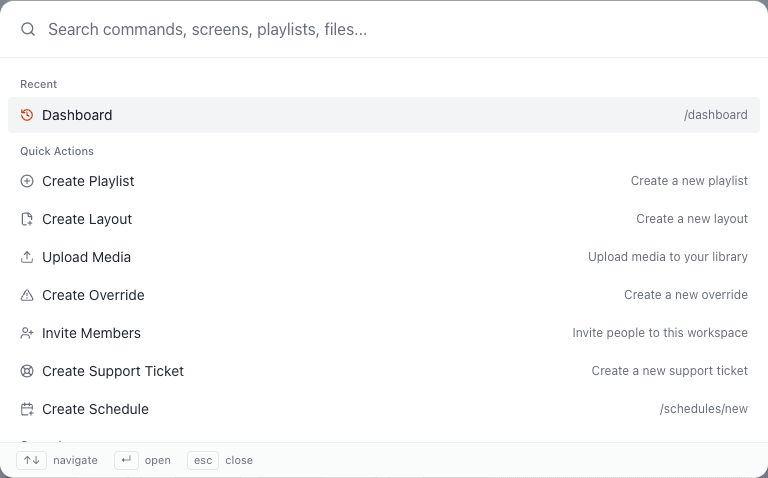
Press Esc to close.
What it can do
Section titled “What it can do”Find your content
Section titled “Find your content”Type a name and results appear from your Media, Playlists, Layouts and Screens. Pick one to open it.
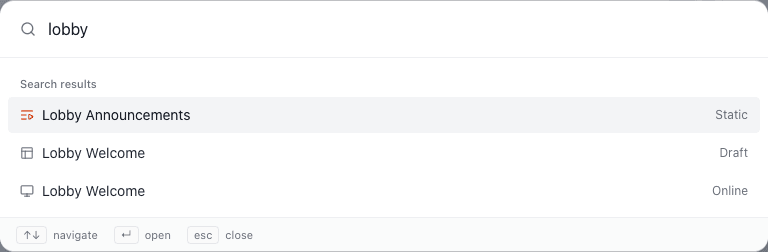
Jump to a page
Section titled “Jump to a page”Type part of a page name, such as sched or time, and press Enter. Pages are grouped by General, Content, Ad Manager, Scheduling and Administration, and include Screens, Screen Groups, Playlists, Layouts, Media, Templates, Campaigns, Advertisers, Proof of Play, Schedules, Time Blocks, Locations, Overrides, Team, Invitations, Groups, Roles, Tags, Audit Log, Support, Billing, Brand Kit, Feeds, Changelog and Settings. You only see those you have access to.
Run quick actions
Section titled “Run quick actions”Start typing an action to create something without hunting for the button:
| Action | Opens |
|---|---|
| Create Playlist | The new-playlist dialog. |
| Create Layout | The new-layout dialog. |
| Upload Media | The upload dialog. |
| Create Schedule | The schedule form. |
| Create Override | The override dialog. |
| Invite Members | The invite dialog. |
| Create Support Ticket | A new ticket. |
Actions relevant to the page you’re on appear first.
Return to where you were
Section titled “Return to where you were”With nothing typed, the palette lists your recent pages.
Move around
Section titled “Move around”- ↑ ↓ to move through results, Enter to open.
- Matching is forgiving: type letters in order (for example tmblk finds Time Blocks).
- Pages with a keyboard shortcut show it beside their name. See Keyboard Shortcuts.
Searching within a page
Section titled “Searching within a page”List pages have their own Search box that filters what’s on that page. Press / to jump straight to it.